
User search card
The user search card pattern display the user information in a single element.
Contents
This is a card built primarily for use on the Browse Frelancers page, but may also be used for other similar context. These cards will often sit alongside other user search cards.
User search cards have been designed to meet the following objectives:
A user search card will typically contain the following information, mostly taken from their user profile page.
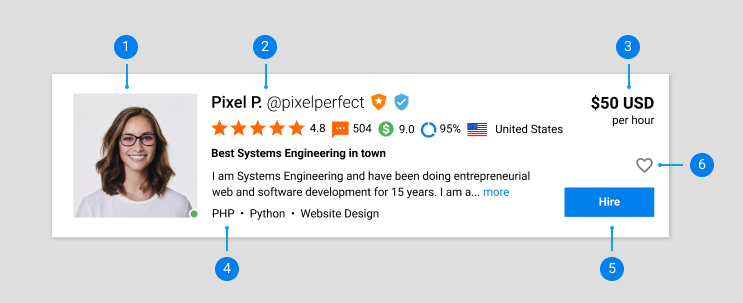
1. User profile image
To give the viewer a good idea at a glance who they are looking at. This includes the online indicator at the bottom right of the image.
2. User information
Compact and quickly scannable information about the user. This includes:
3. Hourly rate
How much the freelancers charges per hour, displayed in their local currency.
4. Freelancer information
A compact version of the freelancer information. This includes:
5. Hire call to action
A button to directly create a project for the freelancer.
6. Lists icon
An icon to add or remove the freelancer from the user’s Lists feature.
User search cards are built to scale responsively, and then snap to a more condensed layout for mobile.
Desktop 
Mobile 